

Your LinkedIn profile is more than just an online CV – it’s your digital personal brand.
At Talent Matters, we speak to candidates daily and review hundreds of LinkedIn profiles, so in today’s competitive job market, recruiters are actively searching for candidates on LinkedIn every day. If your profile isn’t optimised, you could be missing out on opportunities without even realising it.
Whether you’re actively job hunting or open to the right opportunity, here are 5 practical ways to optimise your LinkedIn profile in 2026 and stand out to employers.
1. Use your LinkedIn QR code to grow your network
Networking is still one of the most powerful ways to progress your career and LinkedIn makes it easier than ever.
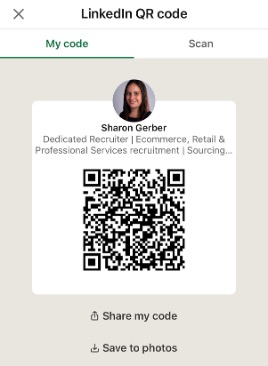
When meeting new people at events, you can quickly connect using your personalised LinkedIn QR code.
How to find it:
-
Open the LinkedIn app
-
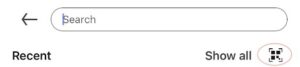
Tap the search bar
-
Select the QR code icon
This allows others to scan and connect with you instantly, helping you build meaningful professional relationships on the spot.
2. Customise your LinkedIn URL for a professional finish
Your LinkedIn URL might seem like a small detail, but it can make a strong impression.
A clean, customised URL:
-
Looks more professional
-
Is easier to share
-
Enhances your personal brand
How to update it:
-
Go to your LinkedIn profile
-
Click Edit public profile & URL
-
Select the pencil icon
-
Remove unnecessary numbers and use your name (e.g. linkedin.com/in/yourname)
This is especially important if you’re including your LinkedIn on your CV, email signature or job applications.

3. Turn on ‘Open to Work’ (without alerting your employer)
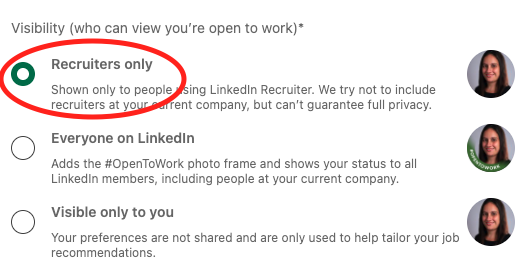
If you’re open to new opportunities, LinkedIn allows you to signal this discreetly to recruiters.
By enabling the private “Open to Work” setting, you can:
-
Share the roles you’re targeting
-
Set preferred locations (including remote or hybrid)
-
Highlight industries or functions of interest
This helps recruiters match you with relevant roles, without the public green banner appearing on your profile.
4. Strengthen your profile with recommendations
Recommendations are one of the most underutilised features on LinkedIn – and one of the most powerful.
They provide third party validation of your:
-
Skills and strengths
-
Work ethic
-
Achievements and impact
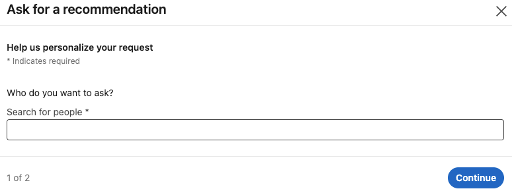
Reach out to previous managers or colleagues and ask for a short recommendation that reflects your contribution and working style.
These testimonials build trust and credibility with potential employers.
5. Optimise your LinkedIn profile with keywords (essential for visibility)
LinkedIn operates like a search engine…Recruiters use keywords to find candidates.
If your profile doesn’t include the right keywords, you may not appear in search results.
Where to include keywords:
-
Headline
-
About section
-
Experience
Examples by role:
-
Marketing Manager: digital marketing, performance marketing, paid media, CRM, campaign optimisation
-
Supply Chain Specialist: inventory management, demand planning, SAP, logistics optimisation, cost reduction
You should also include:
-
Systems and tools (e.g. Salesforce, HubSpot, SAP)
-
Measurable achievements (e.g. “increased revenue by 25%”, “reduced costs by 15%”)
This not only improves visibility but also clearly communicates your value to employers.
Why Optimising Your LinkedIn Profile Matters in 2026
With increased competition in the job market, having a strong LinkedIn presence is no longer optional – it’s essential.
An optimised profile can:
-
Increase your visibility to Recruiters
-
Position you for unadvertised opportunities
-
Strengthen your personal brand
-
Showcase your achievements and career story
On another note, if you are seeking a career change, check out our Open Roles by clicking here.